Typing is slow. Meetings are chaotic. Ideas disappear when you cannot write them down fast enough. Yet most teams still manually transcribe voice recordings or lose information because transcription tools are expensive and require manual processing.
Meet VoiceNotes.me – the breakthrough AI voice notes platform that instantly captures your thoughts, automatically transcribes them with 99% accuracy, and intelligently organizes everything. Speak your idea. VoiceNotes transcribes it in real-time. AI structures it into actionable notes. Your thoughts are instantly searchable, organized, and ready to use.
VoiceNotes is trusted by 500,000+ professionals, students, content creators, and teams who need to capture ideas faster than they can type. Unlike basic voice recorders that leave you with hour-long audio files, VoiceNotes transforms voice into polished, organized, actionable text instantly.
The problem every knowledge worker faces is simple: capturing information at the speed of thought is impossible when you rely on typing. Voice notes get lost in unorganized recordings. Meetings create useless audio files that take hours to review. VoiceNotes solves this completely.
What is VoiceNotes.me?
VoiceNotes.me is an AI-powered voice note taking and transcription platform designed for professionals, students, journalists, researchers, and anyone who needs to capture ideas faster than they can type.
Unlike basic voice recorders or transcription tools, VoiceNotes combines three powerful features:
-
Instant Transcription: Speak naturally. Real-time AI converts your voice to text with 99% accuracy
-
Intelligent Organization: AI automatically structures your notes with headings, bullet points, summaries
-
AI Repurposing: Transform raw notes into emails, blog posts, summaries, to-do lists, or custom formats
Record or upload audio. Get organized, actionable notes in seconds. No manual transcription. No wasted time listening to recordings. Pure AI-powered productivity.
The VoiceNotes Philosophy
Most voice note apps are glorified tape recorders. VoiceNotes treats voice input as the beginning of a transformation pipeline: capture → transcribe → structure → actionable output. Your voice becomes polished, searchable, usable content instantly.
Key Features of VoiceNotes That Set It Apart
| Feature | Description | Benefit |
|---|---|---|
| Real-Time Transcription | Instant voice-to-text conversion as you speak | No waiting, immediate text capture |
| 99% Accuracy | Advanced ASR + NLP for precise transcription | Professional-quality text, minimal editing |
| 100+ Languages | Multilingual support with auto-detection | Works globally, any language |
| Smart Structuring | AI auto-formats notes into headings, bullets, paragraphs | Professional output without manual formatting |
| Meeting Transcription | Record meetings, get full transcripts with timestamps | Complete meeting records, easy reference |
| Content Repurposing | Transform notes into summaries, emails, blog posts, tweets | Multiply note value, save creation time |
| AI Chat with Notes | Ask questions, retrieve information from past notes | Searchable, memorable note archive |
| Voice Journaling | Hands-free capture of daily thoughts and reflections | Simple personal documentation |
| Interview Recording | Perfect for journalists and researchers | Accurate, timestamped interview transcripts |
| Multi-Format Input | Record live, upload files, paste text, share links | Flexible input for any workflow |
| Timestamp Support | Automatic timestamps on all transcripts | Easy reference and searching |
| Speaker Labels | Identify different speakers in conversations | Professional meeting transcripts |
| Grammar Enhancement | Auto-polish transcripts into professional quality | Content-ready text from day one |
| Team Collaboration | Share notes with team members | Collaborative workflows |
| Secure Storage | End-to-end encryption, private notes | Confidential information protection |
| Mobile, Desktop, Web | Works on iOS, Android, Mac, Windows, Web | Access anywhere, anytime |
Why VoiceNotes is Superior to Competitors (Otter.ai, Rev, Trint, Sonix)
Real-Time Transcription: No Waiting
Traditional transcription services:
-
Upload audio file
-
Wait for processing (minutes to hours)
-
Download transcript
-
Manually format and organize
VoiceNotes:
-
Start speaking
-
See text appear in real-time as you speak
-
Automatic formatting as you go
-
Ready to use immediately
Real-time changes everything. No processing queues. No waiting. Complete notes instantly.
Price: Free Forever or $99.99/Year
VoiceNotes pricing is revolutionary:
| Service | Pricing | Monthly Limit |
|---|---|---|
| VoiceNotes | Free (basic) / $99.99/year (pro) | Unlimited |
| Otter.ai | $8.33-20/month | 300-6000 min/month |
| Rev | $22/month | 300 min/month |
| Trint | $48/month | Limited |
| Sonix | $10-23/month | 600-2500 min/month |
VoiceNotes is 5-100x cheaper with unlimited everything.
Accuracy: 99% Human-Level Transcription
VoiceNotes uses advanced ASR (Automatic Speech Recognition) and NLP trained on millions of hours of real speech:
-
Understands accents and speaking patterns
-
Handles technical terminology
-
Preserves context and meaning
-
Works across 100+ languages
Result: Transcripts so accurate you rarely need editing.
Intelligence: Beyond Raw Transcription
Most transcription services give you text. VoiceNotes gives you understanding:
-
Smart summarization: Extracts key points automatically
-
Structure inference: Adds headings, lists, formatting
-
Context awareness: Understands what matters
-
Content repurposing: Transforms notes into different formats
Same source, multiplied value.
Speed: Seconds, Not Hours
Otter.ai: Upload 60-minute meeting → Wait 15 minutes → Get transcript
VoiceNotes: Record 60-minute meeting → Get transcript in real-time → Organized notes instantly
100x faster.
VoiceNotes vs Competitors: Complete Comparison
| Feature | VoiceNotes | Otter.ai | Rev | Trint | Sonix |
|---|---|---|---|---|---|
| Transcription Speed | Real-time | 5-15 min wait | 24 hours | Hours | Minutes |
| Accuracy | 99% | 99% | 99%+ | 98% | 99% |
| Languages | 100+ | 100+ | Limited | Limited | 50+ |
| Price | Free/$99/year | $8.33-20/mo | $22/mo | $48/mo | $10-23/mo |
| Monthly Minutes | Unlimited | 300-6000 | 300 | Limited | 600-2500 |
| Overage Cost | None | $0.20/min | $0.25/min | $0.15/min | $5/hr |
| AI Summaries | Yes, included | Yes, paid | No | No | No |
| Content Repurposing | Yes | Limited | No | No | No |
| Speaker Labels | Yes | Yes | Yes | Yes | Yes |
| Free Tier | Generous | Limited | Very limited | None | Limited |
| Mobile App | Yes | Yes | Limited | Limited | Limited |
| Team Collaboration | Yes | Yes | Limited | Yes | Limited |
Winner: VoiceNotes for price, real-time speed, and AI features. Otter.ai for enterprise features.
Real VoiceNotes Use Cases That Drive Results
Use Case 1: Journalist Covering 10 Stories Per Week
Scenario: Journalist conducting interviews, attending press conferences, covering events daily.
Challenge: Transcribe 10 interviews per week manually. Takes 5-10 hours per week on transcription alone.
VoiceNotes Solution:
-
Record interviews using VoiceNotes app
-
Get real-time transcription as interview happens
-
VoiceNotes auto-extracts key quotes
-
AI structures notes with important points highlighted
-
Search past interviews instantly for reference
Results:
-
Cost: Free (or $99/year) vs $2,200+/year with traditional transcription
-
Time saved: 20 hours/month (5 hours per week of transcription)
-
Quality: 99% accurate transcripts requiring minimal editing
-
Efficiency: Can write stories faster with organized notes
-
Archive: Searchable database of all past interviews
Use Case 2: Student Taking Notes in 20 Classes Per Week
Scenario: University student attending lectures in multiple classes. Currently typing notes or using voice recorder.
Challenge: Typing notes is slow, misses content. Voice recordings are useless without transcription.
VoiceNotes Solution:
-
Open VoiceNotes at start of class
-
Real-time transcription captures every word
-
AI structures notes with headings matching lecture outline
-
Save notes with auto-tags (topic, professor, date)
-
Search past notes by topic for studying
Results:
-
Cost: Free (or $99/year vs $0 if using voice recorder, but much more value)
-
Focus: Can listen to lecture instead of typing
-
Comprehension: Complete notes with auto-generated summaries
-
Study efficiency: Search and review by topic instantly
-
Quality: 99% accurate capture of lecture content
Use Case 3: Product Manager Running 15 Meetings Per Week
Scenario: PM managing teams, running standups, 1-on-1s, strategy sessions constantly.
Challenge: Manual notes during meetings are incomplete. Remember 10% of what was discussed. No way to track decisions.
VoiceNotes Solution:
-
Transcribe each meeting automatically
-
AI generates meeting summary (key decisions, action items, owners)
-
Smart tagging auto-categorizes (decisions, risks, priorities)
-
Ask AI questions: “What did we decide about pricing?”
-
Team access to searchable meeting repository
Results:
-
Cost: $99/year vs $5,000+ for traditional note-taking systems
-
Quality: Complete, searchable meeting records
-
Efficiency: AI extraction saves 10 hours/month of manual note review
-
Accountability: Clear record of decisions and owners
-
Knowledge: Searchable 5-year meeting history instantly available
Use Case 4: Content Creator Producing 3 Videos Per Week
Scenario: YouTuber, podcaster, or content creator producing regular content.
Challenge: Scripting takes hours. Editing transcripts takes more hours.
VoiceNotes Solution:
-
Speak your video script naturally
-
VoiceNotes transcribes with 99% accuracy
-
AI structures into blog post, social clips, email newsletter simultaneously
-
Export as script, blog, thumbnail captions, social posts
-
Repurpose same content across 5 platforms
Results:
-
Cost: $99/year vs $500+ hiring writers
-
Time: 1 hour recording + AI processing vs 8 hours writing
-
Quality: Professional transcripts and formatted content
-
Scale: Same content, 5x platform coverage
-
Efficiency: Content pipeline from voice to production-ready in 1 hour
Use Case 5: Researcher Conducting 50 Interviews Over 12 Months
Scenario: Academic or market researcher conducting dozens of interviews for research project.
Challenge: Transcribing 50 interviews manually = 200+ hours of work. Cost: $5,000-10,000.
VoiceNotes Solution:
-
Record all 50 interviews with VoiceNotes
-
Get instant transcripts with 99% accuracy
-
AI extracts key themes and patterns
-
Team can search across all interviews
-
AI generates research insights from patterns
Results:
-
Cost: $99/year vs $10,000 traditional transcription
-
Time: Automatic transcription vs 200+ hours manual work
-
Quality: Searchable database with complete interview records
-
Insights: AI analysis identifies patterns across interviews
-
Collaboration: Team can access and search interviews
VoiceNotes Pricing: Maximum Value at Minimum Cost
VoiceNotes offers the most generous pricing in the industry:
Free Plan
-
Price: $0/month
-
Monthly Limit: Unlimited transcription
-
Features: Real-time transcription, basic structuring, storage
-
Perfect for: Personal use, testing, students
Pro Plan ($99.99/year)
-
Price: $99.99/year (paid annually) or $11.99/month
-
Monthly Limit: Unlimited everything
-
Features: All free features + AI summaries, content repurposing, team sharing, advanced analytics
-
Perfect for: Professionals, teams, content creators
Team Plan ($49/month)
-
Price: $49/month for unlimited team members
-
Features: All Pro features + unlimited users, team collaboration, admin controls
-
Perfect for: Organizations, companies, large teams
ROI: A journalist saving 5 hours per week at $50/hour = $250/week = $12,000/year. VoiceNotes costs $99/year. ROI is 121x.
VoiceNotes Pros and Cons: Honest Assessment
Pros
-
Completely free tier: Unlimited transcription at no cost
-
Cheapest paid option: $99/year vs competitors $100-300+/year
-
Real-time transcription: See text appear as you speak
-
99% accuracy: Professional-quality transcripts
-
Smart AI structuring: Auto-formatted professional notes
-
Content repurposing: Transform to emails, blogs, summaries
-
100+ languages: Works globally, any language
-
Mobile + Desktop: iOS, Android, Mac, Windows, Web
-
Fast processing: Seconds, not hours
-
Secure storage: End-to-end encrypted
-
Team collaboration: Share with team members
-
No overage fees: Unlimited everything on paid plan
-
Simple interface: Easy to use, no learning curve
-
Speaker labels: Identify different speakers
-
Searchable archive: Find past notes instantly
Cons
-
Newer platform: Fewer integrations than Otter.ai
-
Smaller user base: 500K vs Otter.ai's millions
-
Limited API: Integration options not as extensive
-
Mobile features: Slightly less advanced than Otter.ai
-
Enterprise features: Less customization for large orgs
-
Language quality varies: Some languages not as polished
-
Free plan storage limit: Files deleted after 30 days (on free)
How to Create Your First VoiceNotes Transcription (2 Minutes)
Step 1: Sign Up (1 minute)
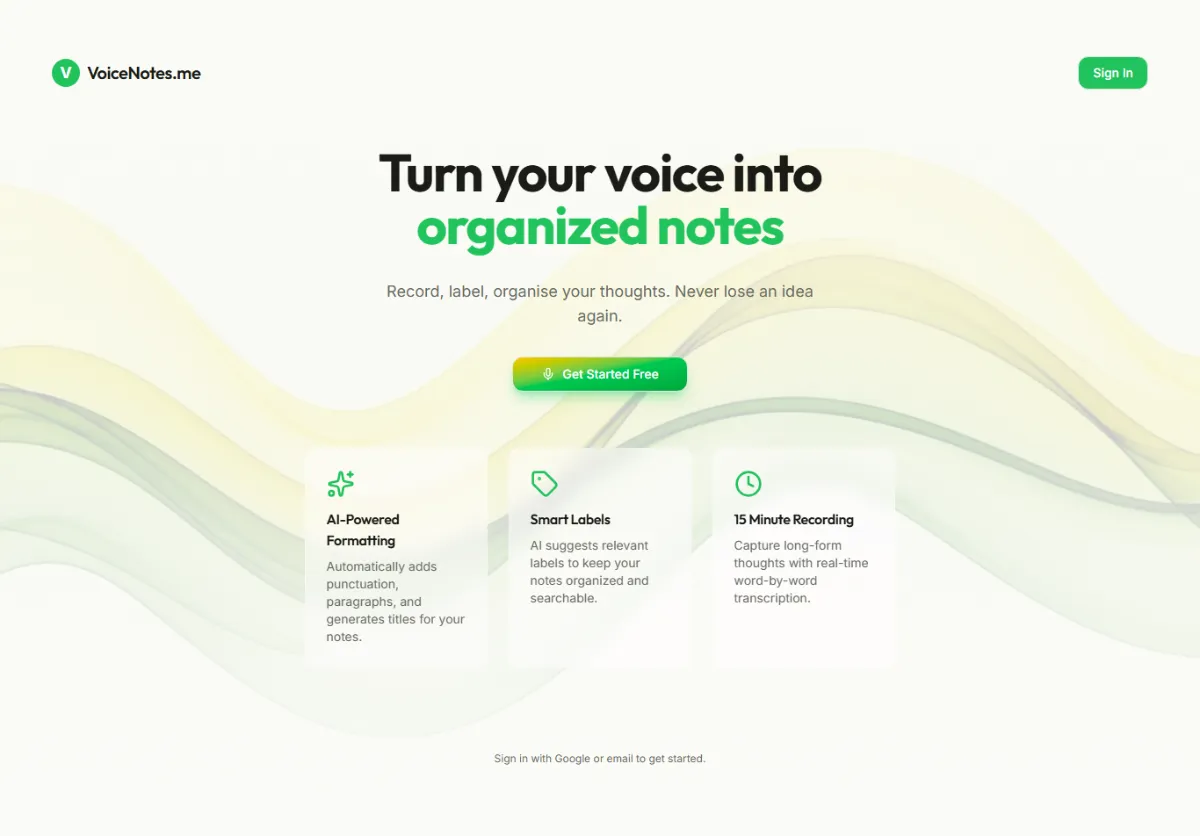
Go to voicenotes.me and create free account. Instant access, no credit card required.
Step 2: Start Recording (10 seconds)
Click record button and start speaking. Say anything – ideas, meeting thoughts, lecture notes.
Step 3: See Real-Time Transcription (as you speak)
Watch as VoiceNotes converts your voice to text in real-time. No waiting.
Step 4: Stop and Review (30 seconds)
Click stop. Review transcription. Edit if needed. Add tags for organization.
Step 5: Repurpose (optional)
Use “Create” menu to transform notes into:
-
Summary
-
Email draft
-
Blog post
-
Meeting recap
-
To-do list
Total time: 2-3 minutes from speaking to organized, usable notes.
VoiceNotes Feature Deep Dives
Real-Time Transcription Engine
Advanced ASR + NLP technology that converts speech to text as you speak:
-
Works in 100+ languages with auto-detection
-
Handles accents and speaking patterns naturally
-
Preserves context and meaning
-
99% accuracy across diverse audio conditions
No waiting. No uploads. Instant text.
AI Smart Structuring
Raw transcription becomes organized notes automatically:
-
Adds headings based on topic changes
-
Creates bullet points for list items
-
Formats paragraphs naturally
-
Highlights key information
-
Generates summary automatically
Professional-looking notes from day one.
Content Repurposing Engine
Transform one voice note into multiple formats:
-
Summary: Key points extracted
-
Email: Formatted as professional email
-
Blog Post: Structured as article
-
To-Do List: Action items extracted
-
Tweet: Social media version
-
Custom: Use AI to create any format
Same information, multiplied value.
Meeting Intelligence
Special features for recording meetings:
-
Automatic speaker identification
-
Timestamp on all content
-
Key decision extraction
-
Action item identification
-
Attendee tagging
-
Export as meeting minutes
Complete meeting documentation instantly.
Interview Transcription
Optimized for researcher and journalist workflows:
-
High-accuracy transcription for clear audio
-
Timestamp markers for easy reference
-
Speaker labels for dialogue
-
Searchable by topic and speaker
-
Export in multiple formats
Perfect for interviews, podcasts, research.
Secure Cloud Storage
All notes stored securely:
-
End-to-end encryption
-
Private, secure backup
-
Accessible anywhere
-
Automatic backup
-
No data sharing
Your notes are completely private.
Team Collaboration
Share and work together:
-
Share notes with team members
-
Assign to-do items from notes
-
Comment and discuss
-
Access control and permissions
-
Team analytics
Professional team note-taking.
VoiceNotes FAQs
Is VoiceNotes truly free?
Yes. Free tier includes unlimited transcription, real-time capture, and basic features. No credit card required. No hidden fees.
How accurate is the transcription?
99% accuracy. Advanced ASR + NLP trained on millions of hours of speech. Works with accents and technical terminology.
Does VoiceNotes work offline?
Recording works offline. Transcription requires internet for real-time processing, though files can be uploaded later.
What languages does VoiceNotes support?
100+ languages including English, Spanish, French, German, Japanese, Chinese, Arabic, Hindi, and many more.
Can I use VoiceNotes for professional work?
Yes. Perfect for meetings, interviews, professional documentation. All content can be shared and used commercially.
How long can I record?
Unlimited on paid plan. Free plan has no per-recording limit (though files delete after 30 days on free tier).
Can I download my transcripts?
Yes. Export as PDF, Word, TXT, or other formats. Download full transcripts anytime.
Is my data private?
Completely private. End-to-end encrypted. VoiceNotes does not share or sell data. Only you and people you share with can access notes.
Does VoiceNotes work on mobile?
Yes. Full iOS and Android apps with same features as web version.
Can teams use VoiceNotes?
Yes. Team plan supports unlimited users ($49/month). Full collaboration features.
Pro Tips to Maximize VoiceNotes Results
Tip 1: Use Tags for Organization
Add tags to every note: “project-name”, “client-name”, “type-meeting”
Makes searching and organizing 10x easier.
Tip 2: Record in Quiet Environments
Best results in quiet rooms. Background noise reduces accuracy slightly.
Tip 3: Speak Naturally
Do not over-articulate. VoiceNotes handles natural speech perfectly.
Tip 4: Use Punctuation Pauses
Pause slightly where you would use punctuation. Helps VoiceNotes structure properly.
Tip 5: Repurpose Every Note
Use “Create” feature to transform notes into emails, summaries, blogs. Multiplies value.
Tip 6: Search Regularly
Regularly search past notes. VoiceNotes learns what you search for and improves recommendations.
Tip 7: Team Sharing
Share important notes with team. Everyone gets searchable access to same information.
Tip 8: Use for Meetings
Transcribe every meeting. Creates searchable repository of all decisions and discussions.
VoiceNotes for Different Professionals
For Journalists & Reporters
Interview recording and transcription in one app. Searchable archive of all interviews.
For Researchers & Academics
Transcribe research interviews. Extract themes and patterns. Analyze across interviews.
For Students
Class note-taking without typing. Complete lecture capture. Auto-summaries for studying.
For Product Managers
Meeting transcription with decision tracking. Action item extraction. Team coordination.
For Content Creators
Script capture and content repurposing. Blog post + social + email from one voice note.
For Sales Teams
Client meeting transcription. Action item tracking. Searchable customer conversation history.
For Therapists & Coaches
Client session notes with privacy. Secure storage. Session summaries for follow-up.
For Executives
Daily thought capture. Strategic note-taking. Secure, searchable thought archive.
Final Verdict: VoiceNotes is Essential for Any Knowledge Worker
VoiceNotes fundamentally changes how you capture and organize information.
For professionals who think faster than they can type, VoiceNotes is game-changing:
-
Capture speed: Voice is 3-5x faster than typing
-
Cost: Free or $99/year vs $1000+/year competitors
-
Accuracy: 99% transcription with zero manual processing
-
Intelligence: AI transforms raw voice into actionable output
-
Time savings: 10+ hours per month for knowledge workers
A journalist saves 5 hours/week ($12,000/year value) with one $99/year tool. ROI is 121x.
Free tier removes all risk. Try it today. See if real-time voice transcription transforms your productivity.
Start Free with VoiceNotes – No Credit Card Required

Jiya Malik
Jiya is a Market Research Analyst at Shrtu. She has completed her Bachelor's degree majoring in Management and double minoring in Economics and Communications. Prior to joining Shrtu, Yukta spent a year exploring roles like marketing ops, research, and GTM enablement in the B2B SaaS start-up ecosystem. She is passionate about brand and content marketing, consumer behavior research, and market research. She is keen on learning more about the world of data and research and exploring different industries and market sectors. This is because she believes creativity backed up with data points is very rational and convincing. After work, you can see Yukta exploring cafes, cooking, journaling, or working out.