If you are a developer looking to write code faster and smarter, you have probably heard about artificial intelligence tools for code generation. But with so many options available right now, picking the right one can feel overwhelming. This guide covers everything you need to know about the best AI for writing code in 2026, from free options to premium solutions that actually work.
What is AI for Writing Code and Why Do You Need It
AI for coding is not about replacing developers. It is about having a smart partner that understands what you are trying to build and helps you write code faster and with fewer mistakes. These tools use machine learning models trained on millions of lines of code from open source projects. They can suggest complete functions, find bugs, explain complex logic, and even write entire applications based on your descriptions.
In 2026 using AI code generation tools is becoming as normal as using Google Sheets or WordPress. Real developers are saving 30-50 percent of their coding time by using these assistants. The question is not whether you should use AI for coding. The real question is which tool fits your workflow best.
Top AI Tools for Writing Code: Complete Feature Comparison
| Tool Name | Best For | Free Tier | Starting Price | Key Feature | IDE Integration |
|---|---|---|---|---|---|
| GitHub Copilot | Real-time code completion | 2K completions/month | $10/month | Context-aware suggestions | VS Code, JetBrains, Xcode |
| ChatGPT | Learning & debugging | Yes (Free tier) | $20/month | Multi-language explanations | Web browser based |
| Cursor | Full codebase projects | Limited free | $20/month | AI-first code editor | Built on VS Code |
| Tabnine | Privacy focused coding | Yes | $12/month | Learns your style | All major IDEs |
| Amazon Q Developer | AWS development | Free for individuals | Custom pricing | AWS integration | VS Code, JetBrains |
| Codeium | Budget developers | Free unlimited | Pay as you go | 70+ languages | Major IDEs |
| Gemini Code Assist | Google ecosystem | Generous free tier | Custom pricing | Multi-modal input | Cloud Shell, VSCode |
Deep Dive: Best AI Coding Assistants Explained
1. GitHub Copilot: The Industry Standard
GitHub Copilot is the most popular AI for writing code right now. It is built by GitHub and OpenAI, which gives it serious power under the hood. The tool sits inside your code editor and watches what you are typing. Then it suggests whole lines of code or even complete functions that match your pattern.
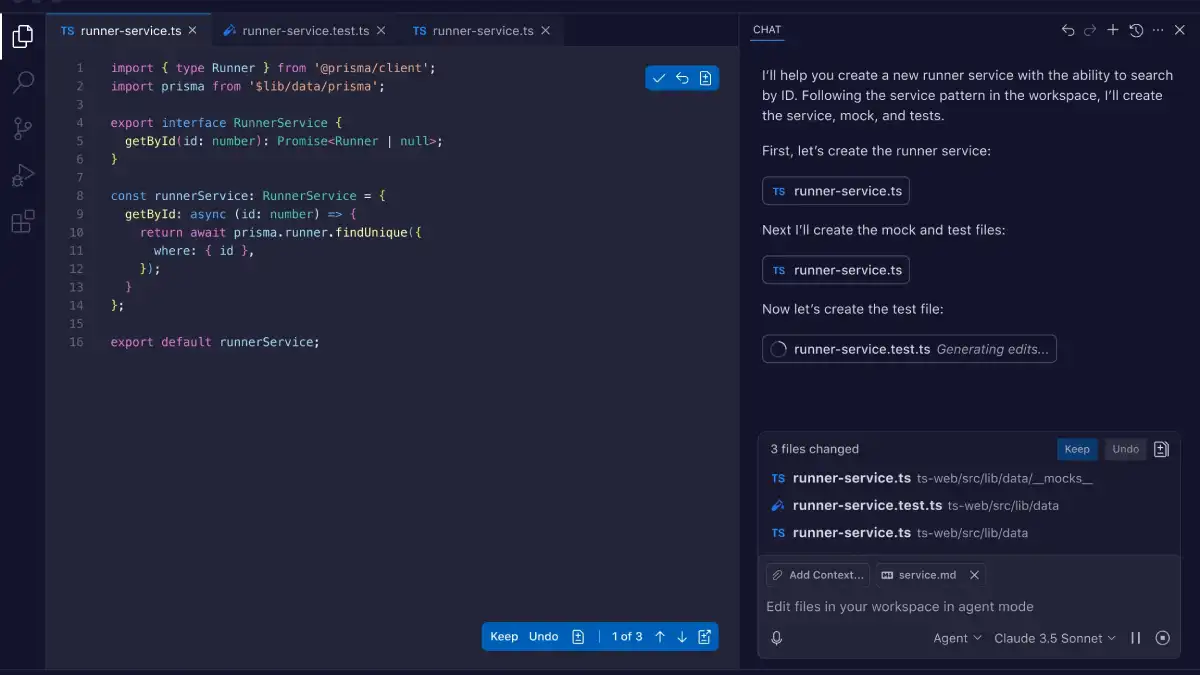
Why Developers Choose Copilot:
- Real-time suggestions as you type
- Trained on billions of lines of public code
- Works inside VS Code, JetBrains, Visual Studio, and more
- Can switch between multiple AI models (GPT-4o, Claude, Gemini)
- Chat feature for explaining code or asking questions
Pros: Seamless IDE integration, accurate suggestions, supports 14+ programming languages, great for experienced developers who want speed
Cons: Paid after free tier runs out, sends code to cloud servers (privacy concern), less helpful for complete beginners who need explanations
Pricing: Free tier (2,000 completions and 50 chat messages per month), then $10 per month for individuals or $19 per user for teams
Try GitHub Copilot Free Today – Get started with real-time AI code suggestions directly in your favorite IDE. Join millions of developers already using Copilot to code faster. Get Started Now
2. ChatGPT: The Most Versatile Option
ChatGPT is not specifically built for coding, but many developers swear it is the best AI for learning how to write code and debugging problems. Unlike Copilot which works inside your editor, ChatGPT sits in a browser and lets you have a conversation about your code.
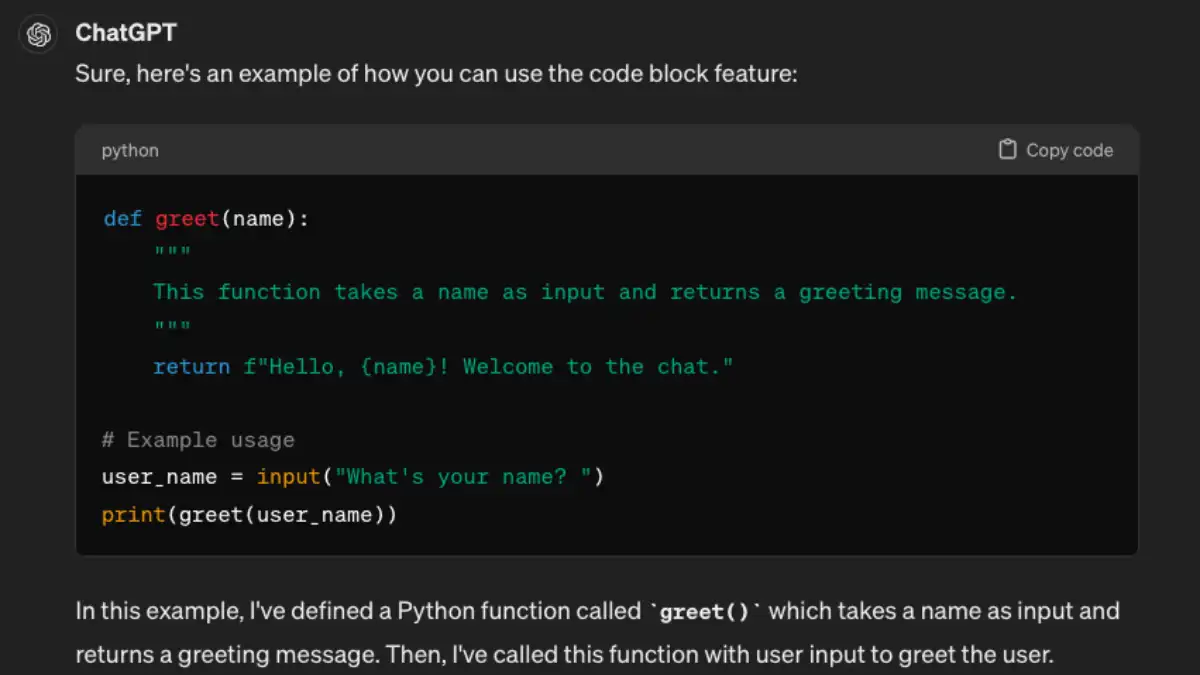
Why Use ChatGPT for Coding:
- Explains code logic in simple terms
- Helps you understand what went wrong and how to fix it
- Generates full scripts or applications from descriptions
- Works across all programming languages
- Free tier is actually quite powerful (GPT-4o available)
Pros: Excellent explanations, conversational approach, great for learning, free tier is generous, understands multi-step logic
Cons: Copy paste workflow (no IDE integration), can be verbose with answers, sometimes generates code that needs fixing
Pricing: Free tier (GPT-4o with usage limits), $20/month for unlimited access
Start Using ChatGPT for Coding – Access powerful code generation and explanations with GPT-4o. Try Free Now
3. Cursor: The AI Code Editor
Cursor is something special. Instead of adding AI to your existing editor, it gives you an entirely new editor built with AI in mind. If you have used VS Code, you already know how to use Cursor because it is built on the same foundation.
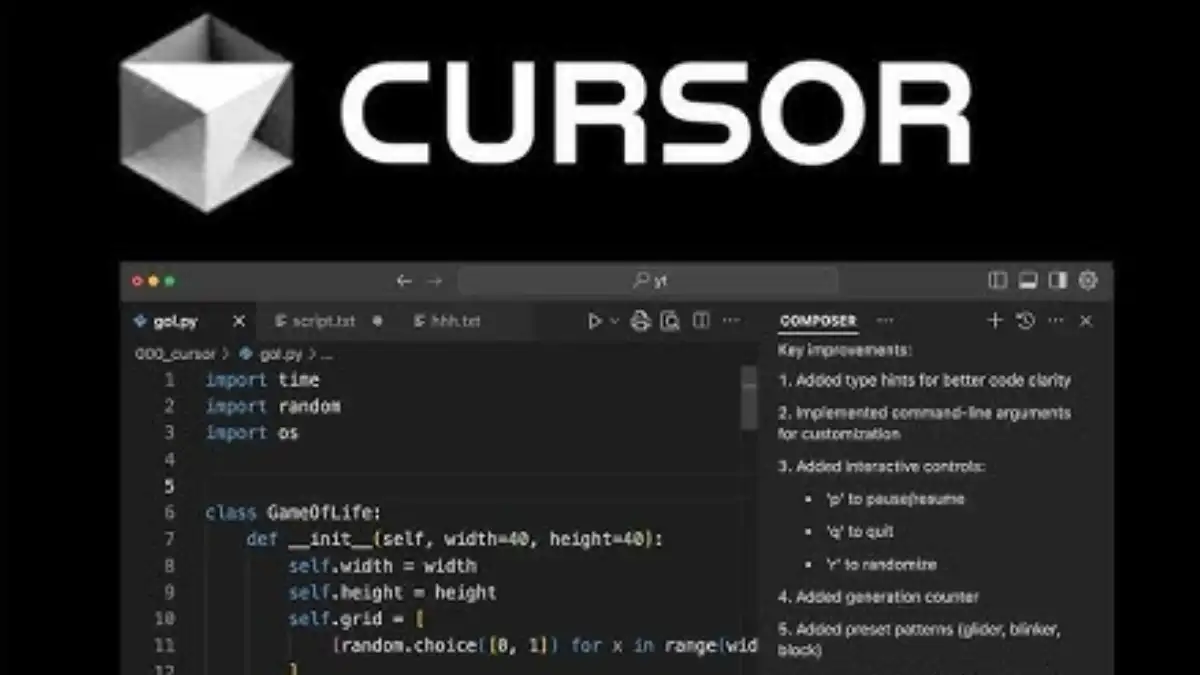
Cursor excels at: Building entire applications, refactoring large codebases, handling multi-file changes, understanding your whole project context
Pros: Full codebase awareness, can make changes across multiple files, great for substantial projects, works with Claude AI by default
Cons: Learning curve for new workflows, limited free trial, higher pricing than some alternatives
Best for: Experienced developers working on serious projects, not ideal for beginners
4. Tabnine: The Privacy-First Option
Tabnine is designed for developers and teams who care about code privacy. Unlike some tools that send your code to cloud servers, Tabnine can run locally on your machine, which means your code never leaves your computer.
Tabnine's Strengths:
- Can run completely offline
- Learns and adapts to your personal coding style
- Works in every major IDE
- Enterprise ready with security controls
- Accurate code suggestions based on your patterns
Pros: Privacy focused, personalization, works offline, enterprise features
Cons: Smaller training dataset compared to Copilot, paid plans start lower but fewer free options
5. Codeium: Free and Powerful
If you want a serious free AI code generator, Codeium is your answer. It supports over 70 programming languages and gives you unlimited free access as an individual developer.
Why Codeium Stands Out:
- Completely free for individual developers
- Fast and lightweight
- Works in VS Code, JetBrains, Jupyter, and many more
- Privacy focused, does not train on your code
- Supports massive language list
Perfect for: Solo developers, beginners learning to code, anyone on a budget
Get Free AI Coding with Codeium – Unlimited free access to AI code suggestions in 70+ languages. No payment required. Start Free Today
6. Amazon Q Developer: AWS Focused
If you work with AWS services, Amazon Q is built exactly for you. It understands AWS architecture, Lambda functions, and cloud best practices.
Key Features: AWS native integration, free for individuals, CLI and IDE plugins, automated testing and security reviews
7. Gemini Code Assist: Google Power
Google has serious resources behind AI and that shows in Gemini Code Assist. It can handle over 20 programming languages and even process images to help with code generation.
Great Features: Multi-language support, free Cloud Shell Editor (50 hours per week), can work with Gemini 2.5 models, integration with Google ecosystem
Try Google Gemini Code Assist – Get 50 hours per week free with Cloud Shell Editor. Powered by Gemini AI models. Get Started
Pros and Cons: AI Code Writing Compared
General Advantages of Using AI for Code
Speed: You write code 30-50 percent faster. What took you 2 hours now takes 1 hour.
Fewer Mistakes: AI catches silly errors before they become bugs. It reminds you of syntax rules without you having to remember everything.
Learn Faster: See different ways to solve problems. Understand best practices from millions of examples.
Debug Easier: Ask AI to explain what is wrong and how to fix it. Get suggestions for improving code quality.
Less Boring Work: Let AI handle boilerplate code and repetitive tasks. Focus on the logic that matters.
Real Limitations to Know About
Cannot Replace Judgment: AI will generate code that looks right but has bugs. You always need to review and test.
Context Limits: Some tools forget what you told them earlier. You might need to repeat instructions.
Privacy Concerns: Most cloud-based tools send your code to servers. Not all of them have strong privacy protections.
Pricing Adds Up: If you use multiple paid tools, costs can exceed $50-100 per month.
Vendor Lock-in: Learning one tool deeply means switching is harder later.
Pricing Breakdown: Free vs Paid AI Coding Tools
Best Free Options
- ChatGPT Free Tier: GPT-4o model with usage limits, browser based, great for learning
- Codeium: Unlimited free for individual developers, 70+ languages, works in all IDEs
- GitHub Copilot Free: 2,000 completions and 50 chat messages per month, limited but real power
- Amazon Q: Free for individuals, AWS focused but very capable
- Gemini Code Assist: Free Cloud Shell Editor with 50 hours per week limit, Gemini CLI free
Best Paid Plans
- GitHub Copilot Pro: $10/month for individuals, unlimited usage, multiple AI models
- ChatGPT Plus: $20/month for unlimited GPT-4o, latest features, fastest response
- Cursor: $20/month for unlimited messages, best for full projects
- Tabnine: $12/month professional, privacy and personalization
Which AI Tool is Right for Your Use Case
For Complete Beginners Learning to Code
You need explanations, not just code. Use ChatGPT or Gemini. Ask questions like “explain this JavaScript loop” or “show me how to connect to a database”. Both have generous free tiers and excel at teaching.
For Experienced Developers Working in IDEs
You want speed and context. GitHub Copilot is the standard choice. It sits in your editor and just works. If you want privacy, Tabnine is your alternative.
For Full Stack Application Development
Use Cursor. It understands entire projects and can make changes across files. This saves hours on big refactors.
For Budget Conscious Solo Developers
Codeium is completely free and surprisingly good. If you grow and want IDE integration, upgrade to GitHub Copilot free tier later.
For AWS Based Projects
Amazon Q understands your cloud architecture. It is free for individuals and gets your AWS work done faster.
For Teams and Enterprises
Consider GitHub Copilot Business or Tabnine Enterprise. You get admin controls, security features, and team support.
Why GitHub Copilot Wins: The Market Leader
GitHub Copilot is not the best AI for every person, but it is the most popular for good reasons:
- Integrated directly into tools developers already use (VS Code, JetBrains)
- Backed by Microsoft, OpenAI, and GitHub which means constant improvements
- Can switch between best AI models (GPT-4o, Claude, Gemini)
- Free tier gives real power, not just a demo
- Supports 14+ programming languages at high quality
- Business and Enterprise plans available
If you are starting out and do not know which tool to pick, GitHub Copilot is the safe choice that most developers use.
ChatGPT vs GitHub Copilot: Which Should You Actually Use
This comparison comes up constantly. Here is the actual answer: they solve different problems.
Use GitHub Copilot if: You are coding in an IDE and want real-time suggestions. You want pure speed. You are experienced and know what you are doing. Your code is in GitHub.
Use ChatGPT if: You are learning to code. You need code explained. You want to understand why something works. You are prototyping ideas. You are debugging strange errors.
The Smart Approach: Many developers use both. Copilot for daily coding speed. ChatGPT when stuck or learning. Pay for one or both depending on your situation.
Advanced: How to Use AI for Coding Effectively
1. Set Up Rules or System Prompts
Tell your AI tool upfront about your coding style. “You are an expert Python developer who writes clean, readable code with proper error handling.” This makes suggestions way better.
2. Break Tasks Into Smaller Chunks
Instead of asking “build me a database API”, ask “write a function to connect to my database” then “add validation to that function”. AI works better with focused tasks.
3. Always Review and Test
AI generated code needs testing. Copy it, run it, check for errors. Do not trust it blindly.
4. Use for Boring Repetitive Work
Let AI write boilerplate, test code, documentation, and simple functions. Use your brain for hard logic.
5. Provide Context
Show AI your existing code structure. Mention libraries you use. Reference your project architecture. Context makes suggestions infinitely better.
6. Iterate, Do Not Start From Scratch
Generate code, then say “make this faster” or “add error handling” or “use async instead”. Iterating gets better results than one big prompt.
Common Mistakes When Using AI for Code Writing
Mistake 1: Trusting code without testing it. AI hallucinates. Always verify.
Mistake 2: Using generic prompts. “Write a login system” is too vague. Be specific: “Write a login function using Node.js that hashes passwords with bcrypt and validates email format”.
Mistake 3: Ignoring security. AI generated code can have security holes. Review for SQL injection, authentication issues, and best practices.
Mistake 4: Not learning. Use AI to supplement learning, not replace it. Understand what the code does.
Mistake 5: Switching tools constantly. Pick one, learn it deeply, then explore others. Switching every week wastes more time than it saves.
AI Code Tools for Different Programming Languages
Python Development
Best Choice: GitHub Copilot or ChatGPT. Both excel with Python. PyCharm also has integrated AI now.
JavaScript and Web Development
Best Choice: Cursor or GitHub Copilot. These understand React, Vue, and modern web frameworks.
Go and Systems Programming
Best Choice: Codeium or GitHub Copilot. Both have strong support for Go and C++.
SQL and Database Work
Best Choice: ChatGPT. It explains queries clearly. Gemini Code Assist also handles SQL well.
Multiple Languages
Best Choice: Codeium (70+ languages) or GitHub Copilot. Both handle polyglot projects well.
Getting Started: Step by Step
Step 1: Choose Your Tool
Start free. Pick either ChatGPT free tier for learning or Codeium/GitHub Copilot free for daily coding.
Step 2: Install It
For IDE tools, install the extension. For ChatGPT, go to ChatGPT.com. Takes 5 minutes.
Step 3: Write Your First Prompt
Be specific. Instead of “help me code”, try “Write a Python function that takes a list of numbers and returns the sum”.
Step 4: Test the Output
Copy the code, run it, check if it works. Learn what works and what does not.
Step 5: Iterate and Improve
Ask follow up questions. “Make it handle empty lists” or “Add comments explaining each step”.
Step 6: Evaluate and Upgrade
After a month, decide if free tier is enough or worth paying for premium.
Integration with Other Tools and Services
Using AI Code with Fiverr Services
Many freelancers on Fiverr specialize in AI assisted coding. They use these tools to deliver projects faster at lower costs. If you need custom AI code integration or want an expert to set up these tools for your workflow, you can find vetted developers on Fiverr.
Get Expert AI Coding Setup on Fiverr – Hire experienced developers to integrate AI tools into your projects and workflows. Start from just $10 with verified experts. Find AI Coding Experts
Combining AI Coding with Time Tracking
Tools like TimeTuna help you track how long coding tasks actually take. When you use AI for code writing, you can compare the actual time saved. This data helps you optimize which tools and techniques work best for your workflow. Try TimeTuna to measure your productivity gains with AI coding.
Common Questions About AI for Writing Code
Is AI Generated Code Good Quality?
It depends on your prompts. Well written instructions to AI produce good code. Vague prompts produce mediocre results. The quality is often 70-80 percent of what an expert would write, which is still way faster than doing it yourself.
Will AI Take My Job as a Developer?
No, but developers who do not use AI might lose their edge. AI is a tool like version control or frameworks. It makes good developers much more productive. What it cannot do is architecture, decision making, or understanding business requirements. Those are human jobs.
Is AI Generated Code Secure?
Not automatically. Security needs review. AI does not always know about SQL injection, authentication holes, or encryption best practices. Always have another developer review code for security issues.
Which Tool Has the Least Learning Curve?
ChatGPT. You already know how to type sentences. Browser-based tools are easiest. IDE integrated tools like Copilot require IDE knowledge first.
Can I Use AI Generated Code in Production?
Yes, but test it heavily and review it. Do not just drop AI code into production without validation. Same rules apply as any code: testing, security review, performance testing.
Does AI Code Work Across Different Operating Systems?
Usually yes. AI tools generate standard code. But always test on your target OS. Platform specific issues sometimes show up only when you test.
How Much Code Can These AI Tools Generate at Once?
Varies by tool. GitHub Copilot suggests lines or functions. ChatGPT and Claude can write hundreds of lines in one response. Cursor handles entire projects. Check token limits for your specific tool.
What Languages Do These AI Tools Support Best?
Python, JavaScript, TypeScript, Java, Go, and Rust are strongest. Less common languages get weaker suggestions. Codeium supports 70+ languages which is broadest coverage.
Can I Train These Tools on My Own Code?
GitHub Copilot learns from your code over time through its chat. Tabnine lets you customize models on your codebase. Most others do not offer this yet.
Are These Tools Worth the Monthly Cost?
If coding is your job, yes. $10-20 per month saves you hours per week which pays back immediately. If you code as a hobby, free tier might be enough.
Conclusion: The Best AI for Writing Code in 2026
The best AI for writing code is the one you actually use. GitHub Copilot wins for most developers because it sits where you are already working. ChatGPT wins for learning and explaining. Cursor wins for big projects. Codeium wins for free unlimited access.
Here is what I recommend: Start with the free tier of GitHub Copilot or ChatGPT this week. Spend 30 minutes using it. See how it feels. Does the IDE integration matter to you? Do you like the conversational approach better? After trying both, pick one and use it consistently for a month. Then decide if you want to pay or if free is enough.
The developers winning in 2026 are not the ones fighting AI. They are the ones who learned how to use these tools as their coding partners. You have nothing to lose by trying. Free tiers let you decide without any risk.
Start coding smarter today. Pick a tool. Try it. Your future self will thank you for the hours you saved.
Ready to Code Faster? Start with GitHub Copilot Free today. Get 2,000 real code completions and 50 chat messages every month at zero cost. No credit card required. Get GitHub Copilot Free
About the Author
This guide was written by a developer with over 10 years of experience using different coding tools and workflows. I have personally tested all of these AI tools over the past 2 years and continue using multiple of them in daily development work. These recommendations come from real experience, not theory.
Resources for Learning More
- GitHub Copilot Documentation – https://docs.github.com/en/copilot
- ChatGPT Official – https://chat.openai.com
- Cursor IDE – https://cursor.com
- Tabnine – https://www.tabnine.com
- Codeium – https://codeium.com

Jiya Malik
Jiya is a Market Research Analyst at Shrtu. She has completed her Bachelor's degree majoring in Management and double minoring in Economics and Communications. Prior to joining Shrtu, Yukta spent a year exploring roles like marketing ops, research, and GTM enablement in the B2B SaaS start-up ecosystem. She is passionate about brand and content marketing, consumer behavior research, and market research. She is keen on learning more about the world of data and research and exploring different industries and market sectors. This is because she believes creativity backed up with data points is very rational and convincing. After work, you can see Yukta exploring cafes, cooking, journaling, or working out.